Manual · Chapter 09
Sequencing
Sequences and patterns: launching and recording them, the pattern editors Roll, Step Edit and Motion, lanes and patterns of their own length, Time Correct, half and double, follow actions and the tempo.
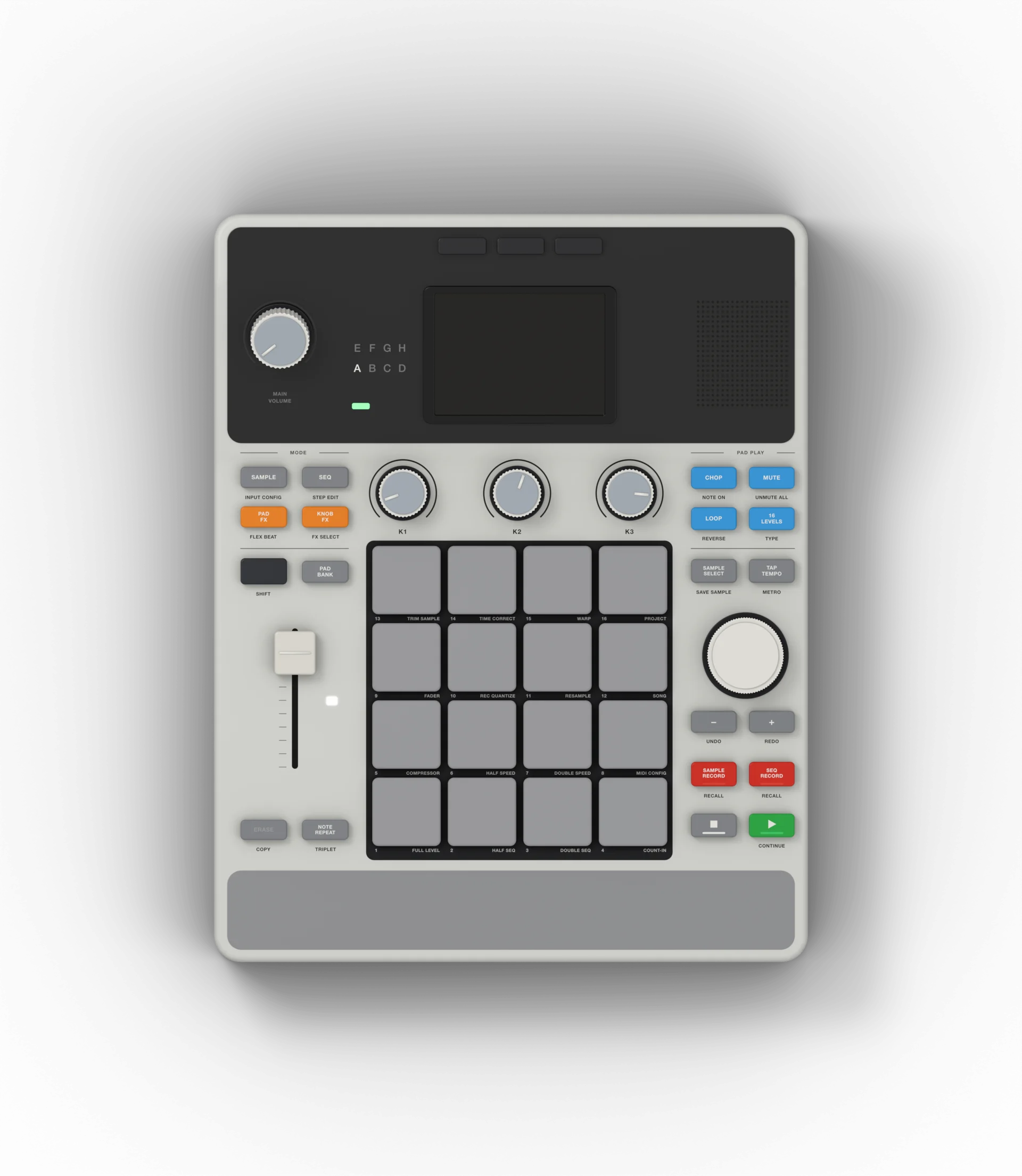
Sequences
A sequence keeps one pattern for each track, or keeps the track off. Launching a sequence puts every track on its pattern at the next bar, as on the stock app.
| Rule | |
|---|---|
| The sequence in hand | The sequence you launched last. When you launch a pattern on a track (on Patterns, or with SEQ held), the sequence in hand keeps it. |
| A new sequence | Keeps nothing: launching it changes no patterns, and every track plays on. The first pattern you launch in it keeps the patterns of all the tracks as they play now. |
| A track off | SEQ + STOP turns the selected track off in the sequence in hand. It stops at the next bar. Press SEQ + STOP again, or launch one of its patterns, to turn it back on. |
| Track mutes | A sequence keeps them. Mute a track (MUTE + pad) and the sequence in hand keeps it muted. Launching a sequence mutes and unmutes its tracks as it keeps them, at the next bar. A track the sequence keeps nothing for keeps its mute. |
| Shared patterns | When two sequences keep the same pattern, an edit changes both. To change one of them, copy the pattern (hold a pad and press another) and launch the copy. A sequence copy (SHIFT + ERASE on Sequences) gets copies of the patterns. |
| Follow actions, chains, the song | Do not change what a sequence keeps. |
The sequence pages
- Press SEQ. It opens the page last open on the selected track: Sequences until you open another.
- Press B1 (SEQUENCES), B2 (ROLL) or B3 (MOTION). On one of these pages, SEQ goes to Sequences.
- On Sequences, press a pad to launch its sequence at the next bar (at once when stopped).
123SHIFT + SEQ opens Step Edit (see The pattern editors).
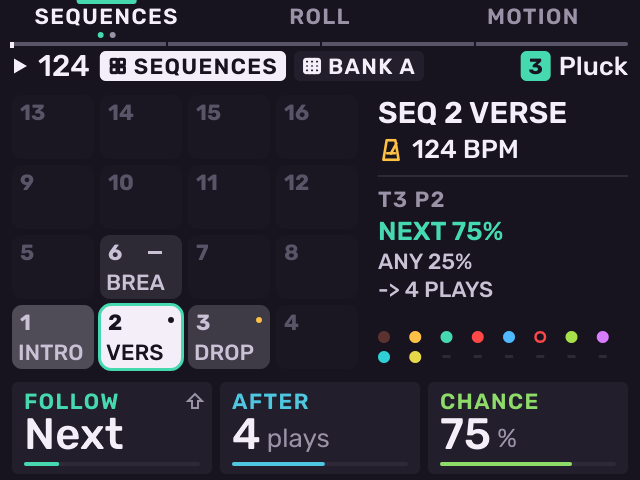
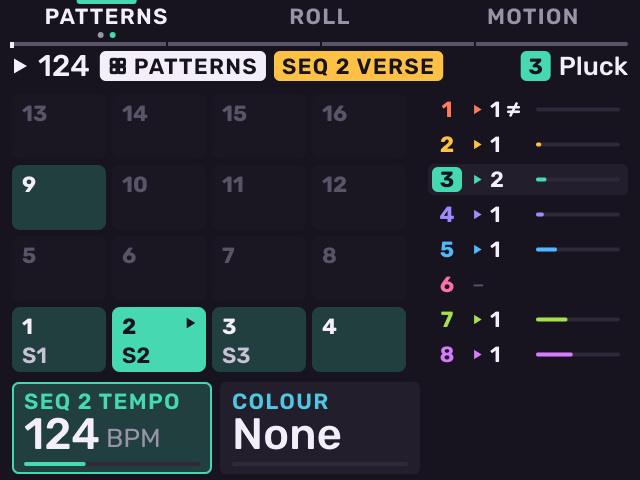
Sequences shows the bank’s 16 sequences, laid out as the pads: pad 1 bottom left, pad 13 top left. See Sequences page for the rest of the page.
Patterns
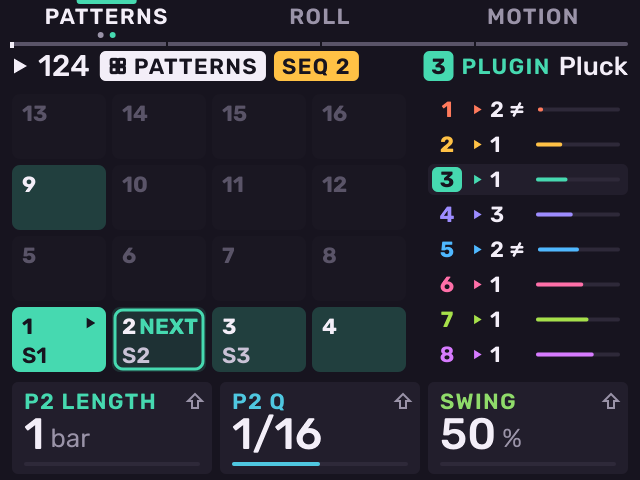
Patterns is the page for one track: use it to pick the pattern the track plays in the sequence in hand. It shows the selected track’s 16 patterns of the bank in view, laid out as the pads.
- On Sequences, press B1 again. Patterns opens. The dots under B1 show which of the two pages is open.
- Press − / + to select the track.
- Press a pad to launch the pattern in that cell on the selected track only. The sequence in hand keeps it.
123What the page shows
| Header | Shows |
|---|---|
| SEQ 2 | The sequence in hand, with its name when it has one. |
| BANK A | The bank, when there is room. |
| A magnet with ON or OFF | Rec Quantize, when there is room. |
| ×2, on the right | The speed of a track at another speed. |
| Cell | Means |
|---|---|
| The number | The pattern number. |
| ▶ | It plays. |
| NEXT and a blinking ring | It is queued for the next bar. |
| A tint | The pattern has notes. |
| An arrow | The pattern has a follow action. |
| S1 S2, or S1 +2 for more | The sequences that keep the pattern. An edit to the pattern changes all of them. |
The pads light as the cells. The right side lists the eight tracks in view:
| Track list | Means |
|---|---|
| ▶ forward, ◀ REV, a die RND | The track’s direction. |
| The number | The pattern the track plays. |
| ×2 | The track’s speed, when it is not ×1. |
| A progress bar | How far the pattern has played. – when nothing plays. |
| OFF | The track is off in its sequence. |
| ≠ | The track is not on the pattern the sequence in hand keeps for it (a follow action, a chain or Song moved it). Push the encoder to put every track back. |
Controls
| Control | Action |
|---|---|
| Pad | Launch the selected track’s pattern at the next bar (at once when stopped). |
| Hold a pad + pad | Copy the pattern. |
| ERASE + pad | Clear the pattern: its notes and Motion (asks first). |
| ERASE alone | Clear the selected track’s pattern the same way (asks first). |
| SHIFT + ERASE | Copy a pattern: press the pattern, then where it goes (on this or another track). |
| SHIFT + pad | The printed SHIFT jobs. |
| Encoder | Select the previous / next track. |
| SHIFT + encoder | Move the playhead by one grid step. Stopped, this sets where SHIFT + PLAY continues from. |
| Encoder push | Launch the sequence in hand again: every track goes back to the pattern it keeps. |
| PAD BANK | Pattern bank A–H. The bank LEDs show it. |
| − / + | Select the previous / next track. |
| K1 | Pattern length: Free, 1 to 16 bars one bar at a time, then 24, 32, 48, 64, 96 and 128 bars. Free is there for an empty pattern: the first take sets the length (see Free length). Notes past a shorter length are kept and play again when the pattern is longer. |
| SHIFT + K1 | The length in 16th notes, 1 to 64 (up to four bars of 4/4). The card shows a length that is not whole bars as 16ths: 7/16. |
| K2 | Grid (Q): 1/4 to 1/64, with triplets. |
| SHIFT + K2 | Time signature. |
| K3 | Swing (50–75 %). The metronome level is on Tempo. |
| SHIFT + K3 | The track’s speed, ×1/64 to ×4 (see Track speed). |
| SHIFT + LOOP | The track’s direction: FWD, REV or RND in turn (see Track direction). |
| SHIFT + B1 | SEQUENCE: the tempo and name of the sequence in hand. Again: back to the pattern cards. |
| SHIFT + B2 | FOLLOW: the selected pattern’s follow action. Again: back to the pattern cards. |
| SHIFT + B3 | VARY: the variation sheet. |
| B1 | Go to Sequences. |
| SHIFT + PLAY | Continue from where playback stopped: the selected track’s place in its pattern, also on a track at another speed. |
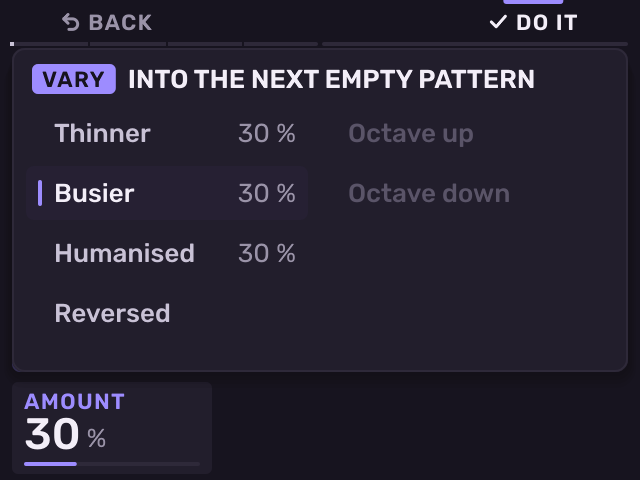
VARY
- Press SHIFT + B3 (VARY).
- Turn the encoder to pick Thinner, Busier, Humanised, Reversed, Octave up or Octave down. Octave up and Octave down are not available on a kit.
- Turn K1 to set the amount of Thinner, Busier and Humanised.
- Push the encoder or press B3 (DO IT). The result is written into the next empty pattern. It plays from the next bar.
123B1 (BACK) closes the sheet.
Hold SEQ
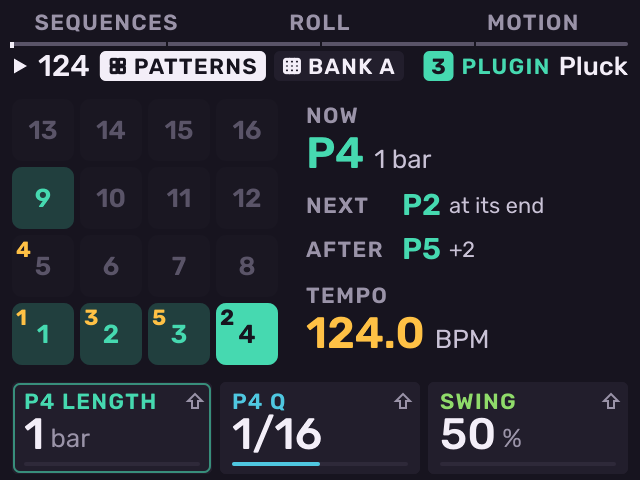
Hold SEQ on any page. The pads become the selected track’s patterns, as on Patterns.
- Hold SEQ.
- Press a pad to launch that pattern on the selected track at the next bar (at once when stopped). The other tracks play on.
- Press more pads in the same hold to make a chain of patterns (up to eight). Each plays once, then the next.
123| Pad light | Pattern |
|---|---|
| Bright | The playing pattern |
| Blinking | A queued pattern |
| Dim | A pattern with notes |
| With SEQ held | Action |
|---|---|
| Pad | Launch that pattern on the selected track at the next bar (at once when stopped). The other tracks play on. An empty pattern starts as long as the one playing. The sequence in hand keeps it. |
| More pads, in the same hold | A chain of patterns, up to eight. Each plays once, then the next. |
| SHIFT + pad | Launch that sequence on every track, as on Sequences. While SHIFT is held, the pads and the sheet show the sequences. |
| SHIFT + more pads, in the same hold | A chain of sequences. Each sequence plays as long as the selected track’s pattern in it, then the next one starts. |
| Hold a pad + pad | Copy the pattern. Hold a pad, step the bank and press a pad to copy across banks. |
| ERASE + pad | Clear the pattern’s notes and Motion (asks first). |
| SHIFT + ERASE | Copy a pattern: press the pattern, then where it goes. |
| − / + | Launch the previous / next pattern. |
| STOP | Turn the selected track off in the sequence in hand, from the next bar. Press it again to turn the track back on. |
| K1–K3 | The length, grid and swing of the selected track’s pattern. |
| Encoder | The tempo. Push it to switch between whole BPM and tenths. |
| B1–B3 | Open Sequences, Roll and Motion. |
| PAD BANK | Step the bank A–H (SHIFT: back). |
| SEQ RECORD | Start a new take in the track’s next empty pattern. |
| SAMPLE RECORD | Freeze or thaw patterns. See Freeze a track. |
Seq + pad
Seq + pad in Settings > SEQ sets what SEQ + pad launches:
| Seq + pad | SEQ + pad | SEQ + SHIFT + pad | Pattern copy |
|---|---|---|---|
| Patterns | A pattern | A sequence | SEQ + held pad + pad |
| Sequences | A sequence | A pattern | SEQ + SHIFT + held pad + pad |
The sheet
After 0.3 seconds the sheet shows the selected track’s patterns:
| Sheet | Shows |
|---|---|
| NOW | What plays now. OFF for a track that is off. |
| NEXT | What plays next. |
| AFTER | With a chain: what follows. A small number on a pad shows its place in the chain. |
| TEMPO | The tempo. |
| OWN | With SHIFT held the sheet shows the sequences. OWN marks a track that is not on the pattern the sequence in hand keeps for it. |
Record
Select a track and a pattern. Then:
- Press SEQ RECORD. When stopped, this arms recording.
- Press PLAY. Recording starts. When playing, SEQ RECORD records at once.
- Press SEQ RECORD again to stop recording. Playback continues.
12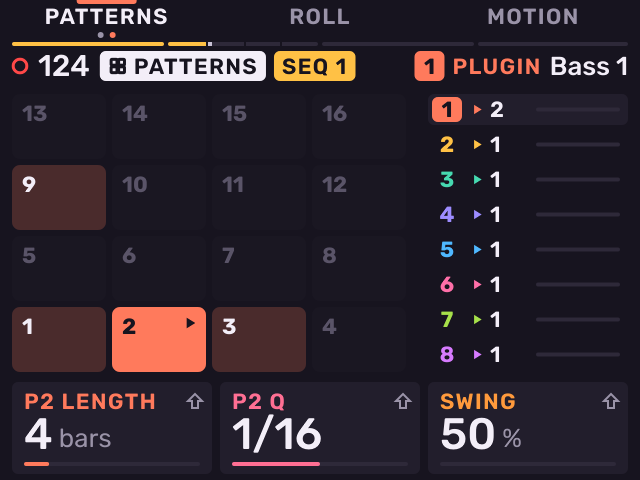
- Recording adds to the notes already in the pattern.
- Each take is one undo step.
- Turn a knob while recording to record it as Motion.
- On Chop, the slice pads record too (see Recording slices).
- While the song plays, SEQ RECORD also writes the patterns you launch into the song. See Record into the song.
| Control | Action |
|---|---|
| SHIFT + PAD 4 | Count-in on or off. A pad hit in the last sixteenth of the count-in records at the start of the take, as long as you held it. |
| SHIFT + TAP TEMPO | Metronome Off, On, or Rec (only while recording). |
| SHIFT + PAD 10 | Rec Quantize on or off, as on the stock MPC. Notes land on the pattern’s Q (K2 on Patterns). The Patterns header shows a magnet with ON or OFF. Mutes and solos have their own setting, Mute quantize (see Mute and solo). |
| PLAY, held while playing | Fill: notes with a FILL condition play. |
| ERASE + SEQ RECORD, on a kit | Erase all notes of the selected pad (asks first). |
Free length
A new pattern is Free: you do not set its length before you record. The K1 card shows Free.
- Select an empty pattern. K1 shows Free.
- Press SEQ RECORD and play. The pattern grows a bar at a time. The card shows P1 FREE and the bars so far.
- Press SEQ RECORD again, or STOP. The pattern ends at the end of the bar that is playing, and loops from there.
| Case | Length |
|---|---|
| SEQ RECORD or STOP pressed in the first eighth note of a bar, from the second bar on | The pattern ends at the bar line just passed. What you played after the line moves to the start. In the first bar it ends at the end of that bar. |
| Other tracks play patterns with notes | A Free pattern takes the length of the longest of them, and K1 shows that length. Free is then not offered: the first take sets the length and the other tracks follow it. |
| A pattern you launch on Patterns or with SEQ held | It takes the length of the pattern playing, as before. |
| To set the length yourself | Turn K1 to a number of bars, or use Half or Double Seq. On an empty pattern, turn K1 below 1 bar for Free again. |
| A take with nothing recorded | The pattern stays Free. |
| Undo | One undo removes the take and makes the pattern Free again. |
| The longest | A pattern grows to 128 bars at most. While the song plays, takes do not grow. |
Recall
SHIFT + SEQ RECORD is Recall. Melodee always keeps the notes you play, recording or not. Recall puts the last phrase into patterns, and those patterns start playing:
| A track that played | Goes into |
|---|---|
| Its pattern is empty | The pattern it plays |
| Otherwise | Its next empty pattern |
In a new project, a jam lands in P1. Recall is one undo step. In Settings (SEQ), Capture bars sets how many bars Recall takes and Capture quantize how it places the notes.
The pattern editors
B2 (ROLL) and B3 (MOTION) open the pattern editors. Press SHIFT + SEQ for Step Edit, on any page.
- Press SEQ for the sequence pages.
- Press B2 (ROLL) or B3 (MOTION).
- For Step Edit, press SHIFT + SEQ, on any page.
123- The header of Roll, Motion and Step Edit names the pattern they edit (P20). It is amber while the track plays another pattern.
- The cards that belong to one pattern name it too: P20 LENGTH, P20 Q.
- A MIDI keyboard playing the track writes notes on Roll and Step Edit as the pads do.
Roll
Roll is a piano roll. On a kit, each row is a pad. The note under the cursor is white and named in the header.
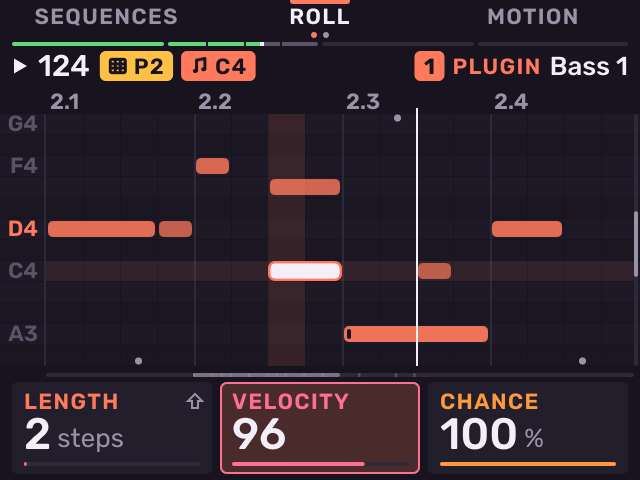
- Turn the encoder to move the cursor.
- Press a pad. It writes a note at the cursor, one step of Q long. Where that note is already written, the pad selects it.
- Turn K1, K2 and K3 to set the note’s length, velocity and chance.
123| Control | Action |
|---|---|
| Encoder | Walk through the notes of a step, low to high, then on to the next step. |
| − / + | Walk the chord in the step, then move the cursor’s pitch a semitone. |
| Pad | Write a note at the cursor, one step of Q long, or select the note already there. |
| PAD BANK | Move the pads up an octave (SHIFT: down). |
| K1, K2, K3 | The length, velocity and chance of the note under the cursor. |
| SHIFT + K1 | Nudge the note early or late. |
| Hold a pad on the note under the cursor, turn K1–K3 | Lock Motion lanes on it. |
| The same with ERASE held, turn a knob | Clear that knob’s lock. The note stays. |
| ERASE alone | Delete the note under the cursor. |
| ERASE + pad | Delete every note of that pad’s key (asks first). |
| Encoder push | The note sheet: accent, slide, tie and delete as cards. Turn the encoder to pick one and push it. B1 closes it. |
| B2 (ROLL) again | The note’s TRIG cards: K1 ratchet, K2 ramp, K3 trig condition, as on Step Edit. Press it again to go back. |
On a kit with 16 Levels on, Roll shows the 16 Levels pad, a row for each pitch. The rows are named from the sample’s own note when it has one.
Marked notes
- Hold SHIFT and turn the encoder to mark notes one by one. The header shows how many (4 SEL).
- Let go of SHIFT. The controls act on all the marked notes.
- Tap SHIFT to clear the marks.
1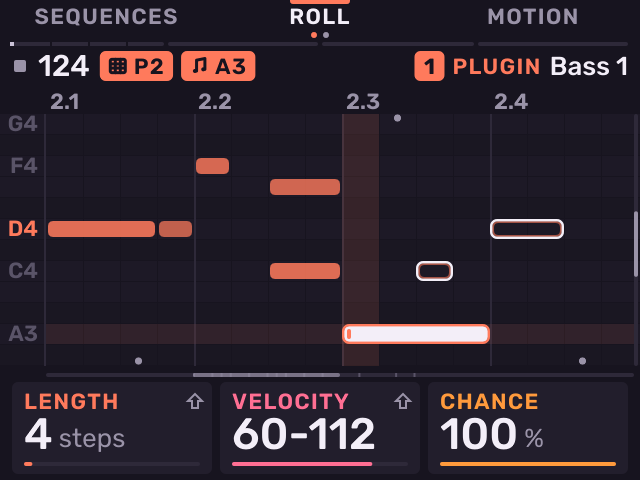
| Control | The marked notes |
|---|---|
| Encoder | Move them a step. |
| SHIFT + encoder | Move them a row. |
| − / + | Move them an octave. |
| K1, K3 | Set their length and chance. |
| K2 | Move their velocities together: 60, 85 and 100 turned up by 10 become 70, 95 and 110. The card shows the lowest and the highest (60-100). It stops when the highest reaches 127 or the lowest 1. |
| SHIFT + K2 (VEL RAMP) | Ramp their velocity from the first to the last. At 0 they all take the first note’s velocity, so K2 then sets them all to one value. |
| ERASE + encoder | Pull them towards the grid, a quarter of the way for each click. |
| ERASE | Delete them. |
| MUTE | Mute them (drawn hollow). Press it again to play them. |
| NOTE REPEAT | Step their ratchet: 2, 3, 4, 6, 8, off. |
| SHIFT + ERASE | Copy them. Move the cursor and push the encoder to paste them there. |
| SHIFT, tapped | Clear the marks. |
The printed buttons on Roll and Step Edit
The printed buttons act on the marked notes, or else on the note under the cursor. They work on Step Edit too.
| Button | Action |
|---|---|
| CHOP | Split each note in two. |
| SHIFT + CHOP | Make the notes legato: each one lasts until the next. |
| SHIFT + LOOP | Reverse them (with none marked, the notes in view). |
| SHIFT + NOTE REPEAT | Write the track’s arp over each chord as notes. Not on kit pads. |
| LOOP | Play only the bars in view over and over (on Roll with notes marked, their bars), also on a track at another speed. It stops when you press LOOP again, leave the editor, or select another track or pattern. |
Follow and note preview
Follow in Settings (SEQ) sets how Step Edit and Roll move with the playhead while the pattern plays:
| Follow | The view |
|---|---|
| Off | Stays where you left it. |
| Page | When the playhead leaves the bar in view, the next bar comes into view. The caret keeps its place in the bar. |
| Step | The caret goes to each step as it plays. |
While it follows, the encoder does not move the caret. Stop to move it. While you hold a step or a note, or a sheet is open, the view stays still.
Note preview in Settings (SEQ, on at first): a note you write or move without playing it is heard once.
| Editor | Heard once |
|---|---|
| Step Edit in STEPS mode | A step you set with a pad, and a held step after you turn the encoder (its new pitch, or on a kit the pad it moved to). |
| Roll | The marked notes after you move them up or down (SHIFT + encoder, − / + an octave) or paste them (push the encoder). |
A move with the encoder is heard when the encoder stops. Pads and MIDI keys are heard as you play them, with the setting on or off.
Step Edit
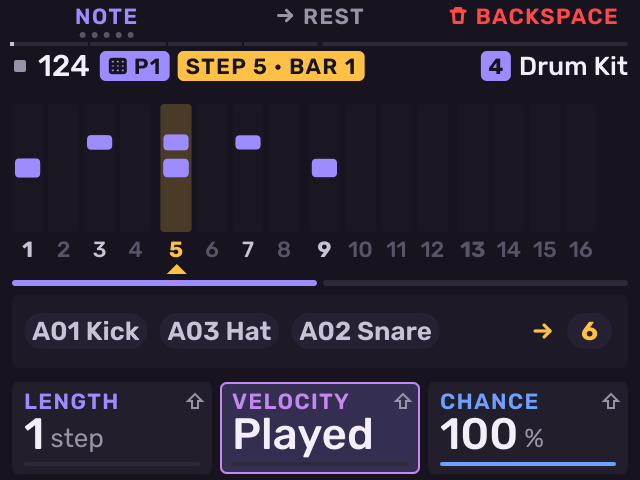
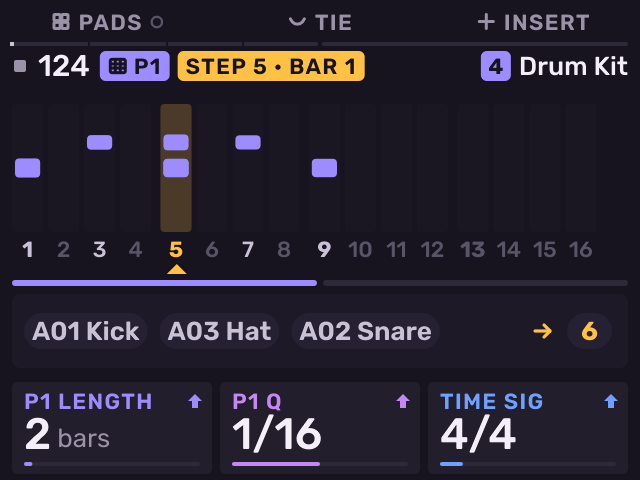
Press SHIFT + SEQ to open Step Edit, the step editor. It shows the caret’s bar.
 12345
| Part | What it shows | |
|---|---|---|
| 1 | Header | The pattern it edits, and STEP and BAR. |
| 2 | Steps | The caret’s bar. Each step’s notes stack by pitch and grow taller with velocity. Ratchet hits sit side by side. The caret’s step is amber. |
| 3 | Bars | The pattern’s bars, as blocks at the foot. |
| 4 | Panel | The pads held, or the step’s notes and the next step. |
| 5 | Knob cards | The card set B1 picks (see Both modes). |
A step can show an accent dot, a tie arc, a slide sign, a lock square, a condition ring and the playhead tick.
The pads have two modes, PLAY and STEPS. SHIFT + B1 (PADS) switches between them. With SHIFT held, PADS is lit in STEPS mode.
PLAY mode
PLAY mode is step entry.
- Press SHIFT + SEQ to open Step Edit.
- Play a pad or a chord. It is written at the caret. The caret moves on when you release the pads.
- Press B2 (REST) to move on without writing, or B3 (BACKSPACE) to go back and remove that step.
123| Control | PLAY mode |
|---|---|
| Pad or chord | Written at the caret. The caret moves on when you release the pads. |
| B2 (REST) | Move on without writing. |
| B3 (BACKSPACE) | Go back and remove that step. |
| Encoder | Move the caret through every bar. |
| K1, K2, K3 | The length, velocity (Played uses your velocity) and chance of what a pad writes. |
| ERASE + pad | Erase all of that pad’s events (asks first). |
| ERASE alone | Delete the note at the caret. |
STEPS mode
In STEPS mode the pads are the 16 steps of the caret’s bar for one sound. The header shows STEPS and the sound’s name.
| Track | The sound |
|---|---|
| A kit or Drums track | The last pad you hit. Hold SAMPLE and press a pad to pick another. |
| A synth | The last note. |
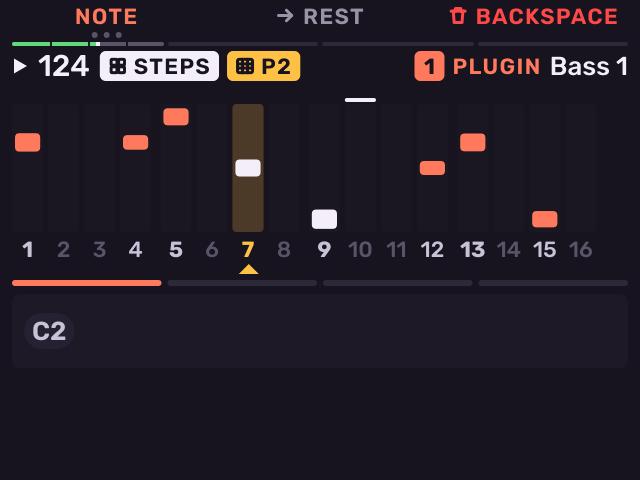
- Press SHIFT + B1 (PADS) for STEPS mode.
- Press a pad to set or clear a step. The pads light the bar’s steps.
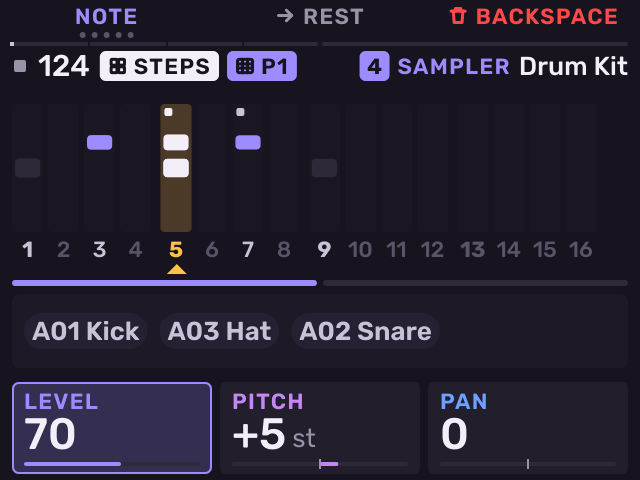
- Hold a step and turn K1–K3 to lock Motion lanes on it (a parameter lock).
123| Control | STEPS mode |
|---|---|
| Pad | Set or clear a step. |
| Hold a step, turn K1–K3 | Lock Motion lanes on it (a parameter lock). |
| Hold a step, turn the encoder | Change its pitch. On a kit this moves the note to the next pad. |
| Hold a step, hold ERASE, turn a knob | Clear the lock of that knob. The step’s notes and its other locks stay. SHIFT + − brings the lock back. |
| K1, K2, K3 | The length, velocity and chance of the step. |
| SHIFT + K1 (LANE), on a kit | The pad’s lane length. See Lanes of their own length. |
| ERASE + pad | Clear the step. |
| ERASE alone | Clear the caret’s step. |
Both modes
| Control | Both modes |
|---|---|
| SHIFT + B1 (PADS) | Switch between PLAY and STEPS mode. |
| B1 | Step through the card sets (below). |
| SHIFT + B2 (TIE) | Tie the caret’s notes into the next step. Press it again to untie. |
| SHIFT + B3 (INSERT) | Put an empty step at the caret and move the rest later. The last step’s notes fall off the end. |
| SHIFT + K1–K3 | Where no other SHIFT job is listed in this section: the pattern length, Q and time signature. |
| − / + | Change the octave (on a kit, the bank). |
| Encoder push, SEQ or SHIFT + SEQ | Go back to Sequences, Patterns, Roll or Motion, whichever was open last on the track. |
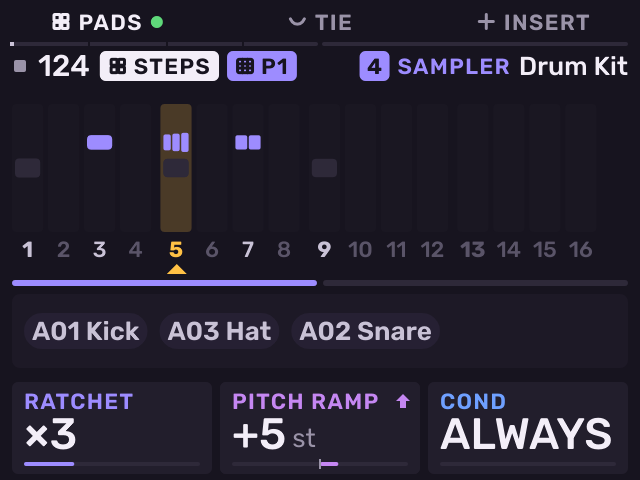
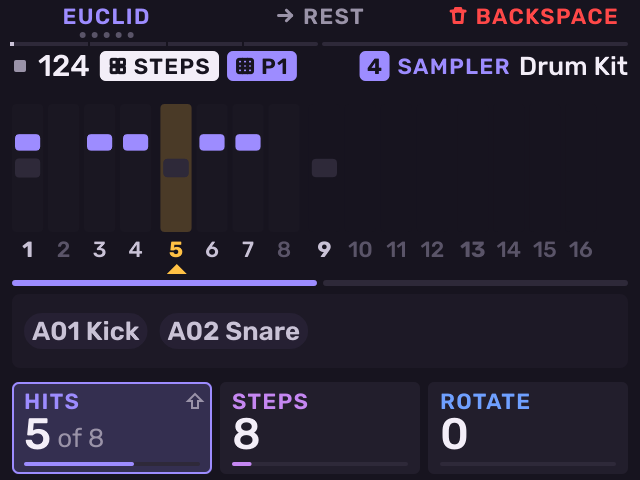
B1 steps through the card sets:
| Card set | On | The cards |
|---|---|---|
| NOTE | Any track | K1 length, K2 velocity, K3 chance. |
| LOCK | Any track | The Motion lanes locked on the caret’s step. ERASE + knob clears one. |
| TRIG | Any track | K1 ratchet (1–8 hits), K2 ramp, K3 trig condition (Always, n:m, Fill, First, Pre, Nei and their opposites). On a kit, SHIFT + K2 sets a pad’s pitch ramp. |
| SOUND | A kit or keygroup | K1 SOUND, K2 SLICE, K3 PLAY. See A step’s own sound. |
| EUCLID | A kit or Drums lane | K1 hits, K2 steps, K3 rotation. SHIFT + K1 sets the lane length. |
A step’s own sound
On a kit or keygroup track, B1 on Step Edit has a fourth card set, SOUND. It sets what the caret’s step plays, or the held step in STEPS mode. On a kit it acts on the lane’s note (the last pad’s).
| Card | Values |
|---|---|
| K1 SOUND | PAD (the pad’s own sample), or any sample on a kit or keygroup pad of the project. The step plays it through its own pad: the pad’s tune, envelope, filter, Pad FX and sends. |
| K2 SLICE | PAD (the whole region), a slice of the sample’s chop, or RND (a slice at random each hit). |
| K3 PLAY | PAD (as the pad plays it), FWD, REV, or RND (forward or reversed at random each hit). |
- ERASE + knob sets that card back to PAD.
- A step with a sample of its own has a ring round its note. A note’s ends show PLAY: pointed back for REV, forward for FWD, both for RND.
- The panel shows where the sound comes from (its track and pad), its name, and the whole sample with the step’s slice lit.
- RND picks the same way each time the pattern plays from the top, so a print or a render plays as you heard it.
The sounds on the pads
SAMPLE SELECT on Step Edit with a step held (or on the SOUND cards) puts the sounds on the pads:
| Control | Action |
|---|---|
| Pad | The step plays that pad’s sample. It is heard once. |
| − / + | The track whose pads are shown (kits and keygroups). |
| PAD BANK | The bank A–H (SHIFT: back). |
| Encoder | The next or previous sound of all the tracks. |
| B1 (CLEAR) | The step plays its own pad again: SOUND, SLICE and PLAY back to PAD. |
| B2 (SLICES) | The pads become the slices of the step’s sample. Press a pad to set SLICE. |
| SAMPLE SELECT or encoder push | Back to the steps. |
A step keeps the sample, not the pad: a pad loaded with another sample later leaves the step as it is.
Make the pattern longer
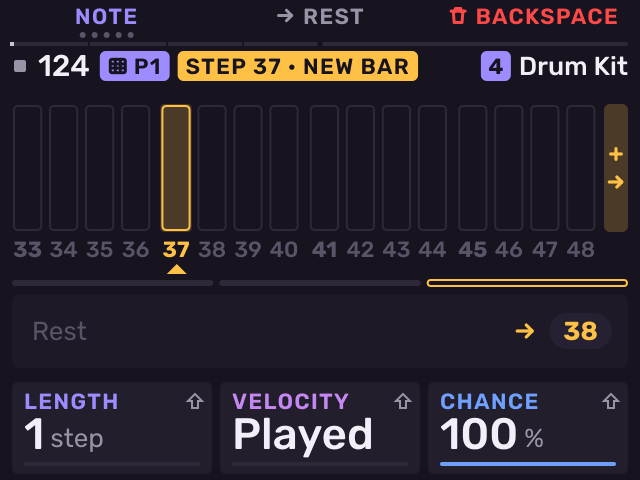
When the caret is on the last bar, a + sign and an arrow show at the right edge. The pattern can grow.
- Turn the encoder past the last step, or press REST, or keep writing. The caret goes on into a new bar. Its steps are outlines and the header shows NEW BAR.
- Write a step there: a pad in PLAY mode, a pad in STEPS mode, or a key on a MIDI keyboard. The pattern grows to the end of that bar. The step and the new length are one undo.
- Leave the new bar empty and the pattern stays as it was. Turn on past it and the caret goes back to step 1.
- In STEPS mode, the pads past the pattern’s end light faint, as empty steps do. Press one to grow the pattern.
- A pattern grows to 128 bars at most.
Motion
Motion lists every lane of the pattern that holds recorded knob movements, one row each: the lane’s name on the left, its line across the pattern on the right.
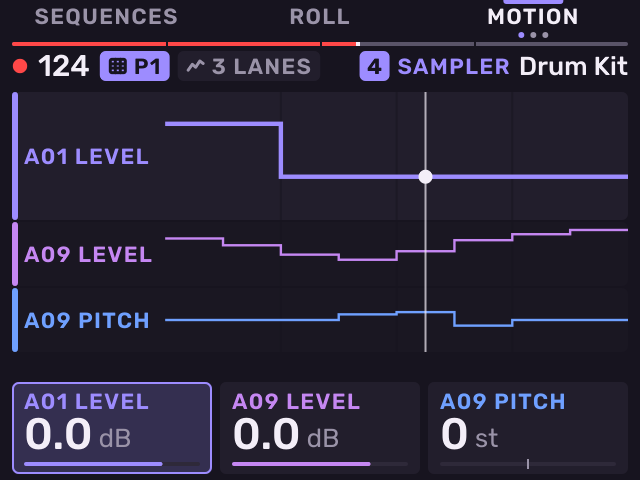 1234
| Part | What it shows | |
|---|---|---|
| 1 | Header | How many lanes the pattern holds (3 LANES). With the encoder on a point: where the point is and its value. |
| 2 | Lane in hand | The tall row. |
| 3 | Lanes | K1–K3’s lanes in their knob’s colour, the other lanes grey. |
| 4 | Knob cards | K1–K3: the lane in hand’s group of three (lanes 1–3, 4–6 and so on). |
- Seven rows show at a time. With more, the list follows the lane in hand, and an arrow with a number shows how many lanes are below.
- A lane whose effect slot has since been emptied is listed by its slot and parameter (FX 2 PARAM 1), so its points can be erased.
- A pattern with no Motion shows No motion.
- On a kit, pads with Motion are lit, the pad of the lane in hand white.
- Turn SEQ RECORD on (see Record).
- Turn a knob, on any page. Its movement is recorded as Motion.
- On a kit, hold MUTE and press a pad. The mute goes into the pattern on the pad’s MUTE lane, on or off, with no steps between.
123- Each pass of the pattern starts with the pad mutes as you set them, and STOP puts them back.
- A pad’s MUTE lane shows on Motion as A05 MUTE. Turn its knob to mute or unmute the pad there.
| Control | Action |
|---|---|
| − / + | The lane before or after. Past K3, the next three lanes come onto the knobs. |
| K1–K3 | Turn: that lane in hand. With SEQ RECORD on, the move is recorded into it. A kit pad’s lane selects that pad. |
| Pad, on a kit | Plays the pad and puts its first lane in hand. |
| Encoder | Walk through the points of the lane in hand. |
| ERASE, stopped | Erase the point under the cursor. |
| ERASE held, playing | Erase the points of the lane in hand as the playhead passes them, shown in red. Let go to stop. One undo. |
| ERASE + K1–K3 | Erase that knob’s lane at once, with no question. SHIFT + − brings it back. |
To erase one point:
- Pick the lane with − / +, its knob or its pad.
- Turn the encoder to walk through the lane’s points. The point under the cursor is white.
- Press ERASE. The point goes, and the cursor moves to the next one.
123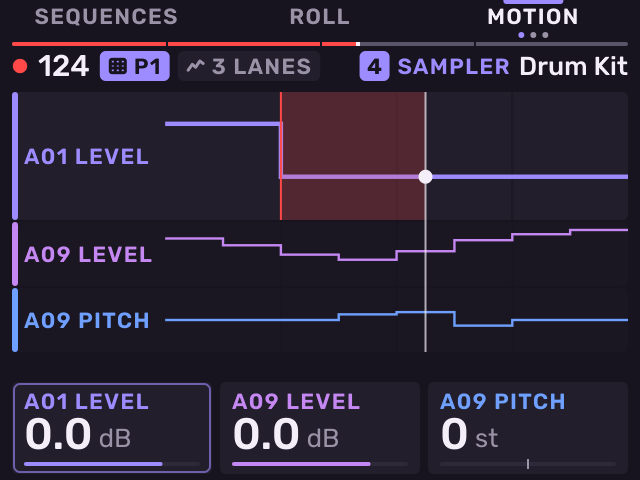
A step lock (see Step Edit) shows on its lane as a short bar at its value, as long as it holds. With the encoder on a lock, the header reads LOCK before its place.
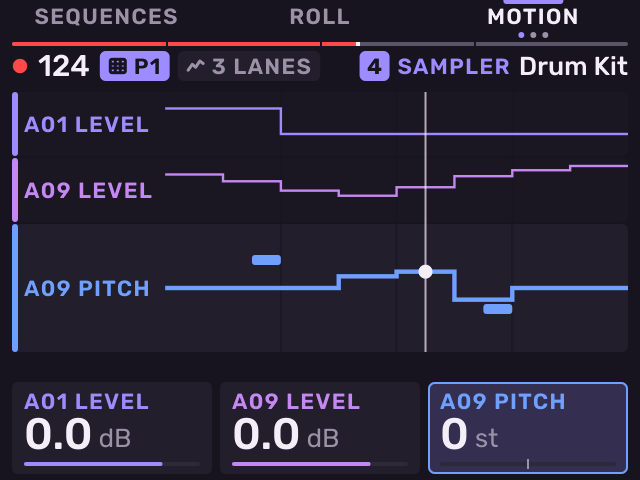
Draw mode
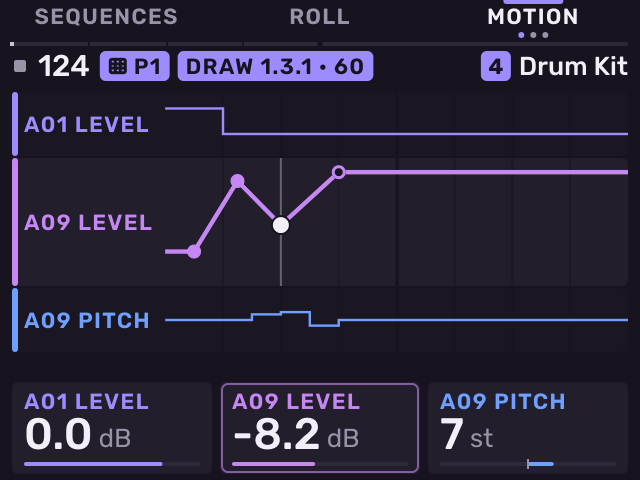
Draw Motion by hand, as points joined by straight lines, without SEQ RECORD.
 123
| Part | What it shows | |
|---|---|---|
| 1 | Header | DRAW, the cursor’s place and the value of the point under it. |
| 2 | Lane in hand | Its points. Filled dots go in a line to the next point, ringed dots hold. The point under the cursor is white. |
| 3 | Knob cards | The value of each lane’s point under the cursor. |
- On Motion, press SHIFT + B3 (DRAW). Press it again to turn draw mode off.
- Pick the lane with − / +, its knob or its pad.
- Turn the encoder to move the cursor, one step of Q at a time. Push it to add a point there.
- With SEQ RECORD off, turn the lane’s knob to set the point’s value.
1234- To start a new lane, turn its parameter first, on any page. With draw mode on, Motion lists it as an empty row, and SHIFT + B3 puts it in hand.
- On a pattern with no Motion, the first lane offered is the kit’s last pad’s tune, else the track’s first favourite.
- The lane goes in a straight line from a point to the next. Before the first point it holds the first point’s value, after the last point the last one’s.
- The cursor goes as far as the pattern’s end. A point there is the value the lane reaches as the pattern comes round.
| Control | Action in draw mode |
|---|---|
| Encoder | Move the cursor one step of Q. It stops on each point of the lane on the way. |
| Encoder push | Add a point at the cursor, at the value the lane has there. |
| Encoder push on a point | Switch it between a line to the next point and a step that holds. Points on a MUTE lane always hold. |
| K1–K3, SEQ RECORD off | Set the value of the point under the cursor. The fader does the same when it follows that knob. |
| SHIFT + encoder | Move the point under the cursor. |
| ERASE | Erase the point under the cursor. |
Each edit is one undo step. Up to 64 lanes of a pattern can go in a line at the same time.
MOD and MACRO
B3 has three pages: MOTION, MOD and MACRO. Press B3 again to step through them. The dots under the key show which one is open. B1 and B2 stay SEQUENCES and ROLL on all three.
| Page | What it holds |
|---|---|
| MOTION | The pattern’s recorded knob movements, as lanes. |
| MOD | Eight modulators. Each is an LFO (synced or free) or an envelope follower of a track or bus. It moves up to four parameters anywhere in the project. |
| MACRO | Eight macros. Each turns up to eight parameters at once, each between its own low and high value. |
- Turn the knob of the parameter to move, on its own page.
- On Motion, press B3 for MOD, again for MACRO.
- Press − / + to select the modulator or macro.
- Press SHIFT + B3 (ADD). The last knob you turned is assigned to the modulator or macro in view.
1234Turn the encoder to pick a target. Push the encoder or press ERASE to remove it.
| Page | K1 | K2 | K3 |
|---|---|---|---|
| MOD | Modulator 1–8 | Rate (a follower: rise) | The target’s depth |
| MOD, SHIFT | Off, LFO or Follow | LFO shape, or the follower’s source | Free or Sync (a follower: fall) |
| MACRO | Macro 1–8 | Its value | The target’s high end |
| MACRO, SHIFT | The target’s low end |
Lanes of their own length
On a kit, each pad’s lane can loop at a length of its own, shorter than the pattern. A hi-hat lane of 6 steps in a 16-step pattern goes round on its own against the other pads.
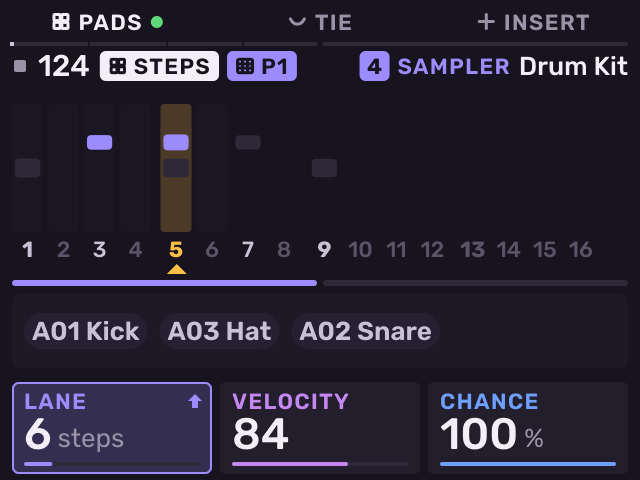
- Press SHIFT + SEQ to open Step Edit.
- Press SHIFT + B1 (PADS) for STEPS mode.
- Hold SAMPLE and press the pad whose lane you want to set.
- Hold SHIFT and turn K1 (LANE) to set the lane’s length in steps. All is the pattern’s length.
1234The header shows the lane’s length (LANE 6). The steps past its end are dark, and the playhead goes round with the lane.
| Control | Action |
|---|---|
| SHIFT + K1 in STEPS mode | Set the lane’s length: 1 step to All. |
| SHIFT + K1 on the EUCLID cards | The same. |
- The lane starts with the pattern, then loops on its own. Trig conditions count the lane’s own passes.
- SEQ RECORD and Note Repeat write the lane’s notes where the lane plays them.
- Time Correct and the pattern’s feel keep the lane’s notes inside the lane.
- Notes past the lane’s end are kept but not played.
Patterns of odd lengths
Each track’s pattern loops at its own length. A pattern of 7 16ths on one track against 16 on another goes round against it: a polymeter across tracks.
- On Patterns, select the track (− / +).
- Hold SHIFT and turn K1 to set the length in 16ths, 1 to 64. The card shows 7/16.
12- The pattern starts on the bar it is launched on, then loops on its own.
- For whole bars, turn K1 without SHIFT.
Time Correct
Time Correct changes how the pattern plays without moving the notes, until you apply it.
- Press SHIFT + PAD 14.
- Turn K1 (grid), K2 (strength) and K3 (swing).
- Press SHIFT + PAD 14 again to close it.
12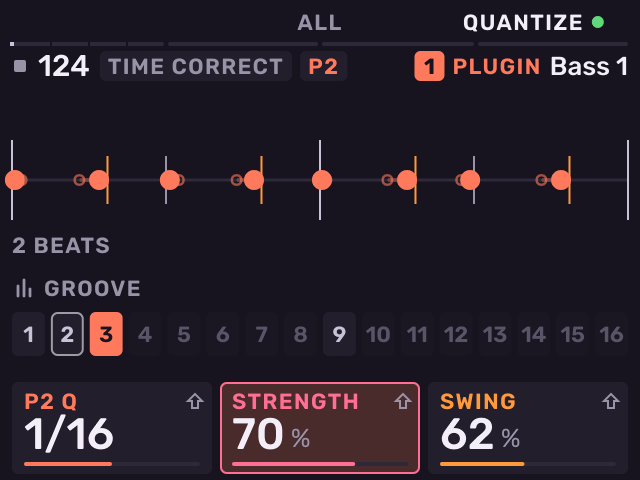
| Control | Action |
|---|---|
| K1 | Grid. |
| K2 | Strength. |
| K3 | Swing. Swing needs some strength: at 0 % strength the swing card is dim. |
| SHIFT + K1 | Humanize. |
| SHIFT + K2 | Velocity humanize. |
| SHIFT + K3 | Groove amount. |
| ERASE + a knob | Set that value back to its default. |
| Pads | Play the track’s sounds, so you hear the timing as you turn. |
| − / + | Go to the previous or next pattern of the track. |
| B3 (QUANTIZE) | Turn Time Correct off and on, to compare. |
| B2 (GROOVE), held | Take the groove from another pattern (below). |
| SHIFT + B2 (ALL) | Apply the same settings to the track’s other patterns. |
| B1 (APPLY) | Move the notes to where Time Correct plays them, with the velocities you hear, and set Time Correct back to off. The pattern sounds the same, and Roll and Step Edit show the notes on the grid. Undo takes it back. APPLY shows while Time Correct changes the pattern. |
| SHIFT + PAD 14 | Close Time Correct. |
Take the groove from another pattern
- Hold B2 (GROOVE). The pads and the screen show the track’s patterns: the groove’s pattern lit, the pattern you are correcting white, patterns with notes dim.
- Press a pad. Its pattern’s timing and accents play on your notes at once. Press the same pad again for no groove.
- Press PAD BANK for the next bank of patterns, − / + for another track’s patterns.
- Let go of B2. The pads play the track’s sounds again, and the screen shows GROOVE with the pattern’s name.
123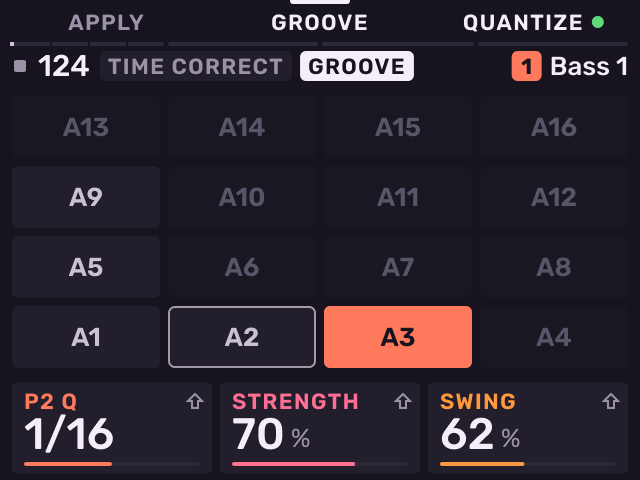
A pattern written on the grid (step entry, or recorded with Rec Quantize on) gives a groove of accents only: its notes have no timing to take.
Half and double
| Control | Action |
|---|---|
| SHIFT + PAD 2 (Half Seq) | Halve the pattern’s length. What lies in the second half is removed. |
| SHIFT + PAD 3 (Double Seq) | Double the pattern’s length. The new half is a copy of the first, or empty: Double Seq in Settings (SEQ). |
| SHIFT + PAD 6 (Half Speed) | Each note twice as far from the start and twice as long. The length stays: notes moved past the end are removed. |
| SHIFT + PAD 7 (Double Speed) | Each note half as far from the start and half as long. The length stays. |
1Motion and kept Pad FX punches go with the notes. Each is one undo step.
Sequences and follow actions
A sequence keeps a pattern, or off, for each track (see Sequences). Patterns shows the sequence in hand in its header.
On Patterns, push the encoder to launch the sequence in hand again at the next bar: every track goes back to the pattern it keeps, at the sequence’s tempo.
The SEQUENCE cards
On Patterns, SHIFT + B1 (SEQUENCE) opens the cards of the sequence in hand. The header shows its number (SEQ 2) and its name.
| Control | SEQUENCE |
|---|---|
| K1 | The tempo of the sequence in hand (below 30 is None). |
| K2 | Its colour. |
| Encoder push | Name the sequence. |
| ERASE | Clear the sequence (one undo). |
Follow actions
The follow action of a pattern is what the pattern does after it has played for a while.
- On Patterns, press SHIFT + B2 (FOLLOW). The cards set the selected pattern’s follow action.
- Turn K1 (FOLLOW), K2 (AFTER) and K3 (CHANCE).
- To put the follow action on the pattern each other track is on, push the encoder.
123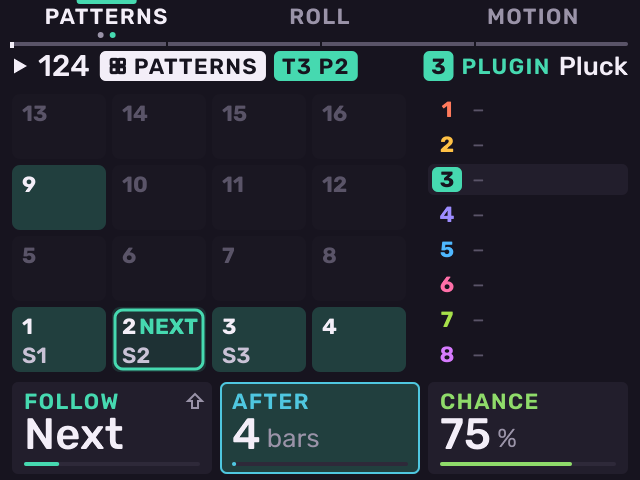
| Card | Sets |
|---|---|
| K1 (FOLLOW) | Next, Previous, Any, Again or Stop. |
| K2 (AFTER) | After 1–64 bars, or 1–64 plays. |
| K3 (CHANCE) | The chance of the first action. |
| SHIFT + K1 (OR) | The second action. |
| Encoder push | Put the follow action on the pattern each other track is on. |
Sequences page
SEQ opens Sequences. On Patterns, press B1. The pads are the bank’s 16 sequences, laid out as the pads. The sequence launched last is the sequence in hand.
| Control | Action |
|---|---|
| Pad | Launch its sequence at the next bar. |
| PAD BANK | Step the bank. |
| ERASE + pad | Clear the sequence: it keeps nothing again and loses its name, tempo and colour. Undo brings it back. |
| SHIFT + ERASE, then two pads | Copy the first sequence onto the second (see Copy a sequence). |
| Encoder | The tempo of the sequence in hand (below 30 is None). |
| SHIFT + encoder | Its colour: its cell and its pad light in it. |
| Encoder push | Name the sequence in hand. |
| ERASE | Clear the sequence in hand. |
| K1–K3 | The selected pattern’s follow action, as on FOLLOW. In Basic there are no follow actions: K1–K3 set the length, grid and swing of the selected track’s pattern, as on Patterns. |
| SHIFT + K1 | The second action. |
| SHIFT + B3 (ALL) | Put the follow action on the pattern each other track is on. |
| − / + | Select the track. |
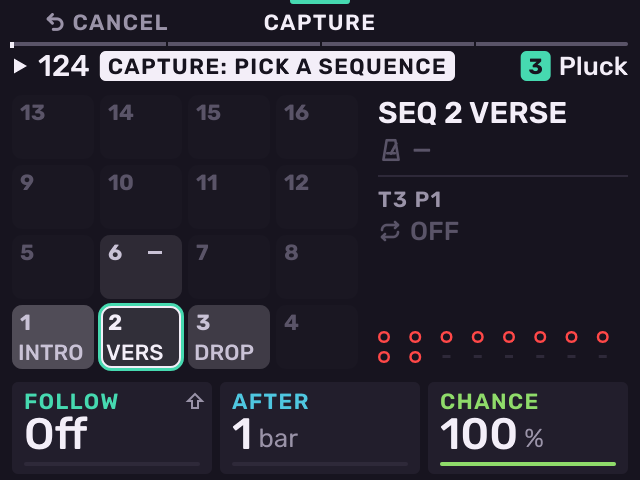
| SHIFT + B2 (CAPTURE), then a pad | That sequence keeps the patterns playing now (a stopped track is kept off), as one undo. No notes are copied. B1 (CANCEL) stops before a pad. |
| Cell | The sequence |
|---|---|
| Tinted | Keeps patterns. |
| Plain | Keeps nothing (it is new). |
| A dash | Keeps only silence: every track off or on an empty pattern. |
The marks on the right are the tracks:
| Mark | The track |
|---|---|
| Bright | On the pattern the sequence in hand keeps. |
| Dim | On another pattern. |
| Red | Muted. |
| A square | Off. |
| A red ring | Stopped by a follow action. |
Copy a sequence
- On Sequences, press SHIFT + ERASE.
- Press the sequence to copy.
- Press the pad it goes to.
- Press ERASE to stop.
1234- The copy gets the name, tempo, colour and mutes.
- Each pattern the sequence keeps is copied into the track’s next free pattern (empty, kept by no other sequence and not in the song), so the two sequences can be edited apart.
- A track with no free pattern keeps the same pattern in both: the notice says how many (2 shared).
- The copy is one undo.
Sequence colour
- Hold the encoder to open the Menu, and push COLOUR (on Patterns: SEQUENCE COLOUR). The pads light in the 16 colours.
- Press a pad, or turn the encoder, to pick a colour for the sequence in hand.
- Press B3 (DONE) or push the encoder to keep it (one undo).
123B1 (BACK) keeps the colour it had. B2 (NONE) takes its colour away.
Tempo
| Press | Tempo |
|---|---|
| Tap TAP TEMPO | Set the tempo by tapping. |
| Hold TAP TEMPO and turn the encoder | Set it by a whole BPM, as on the stock app. The Tempo page shows while you hold, and goes back when you let go. |
| Hold TAP TEMPO for half a second without turning | Open the Tempo page and keep it open. Hold TAP TEMPO again there to close it. |
12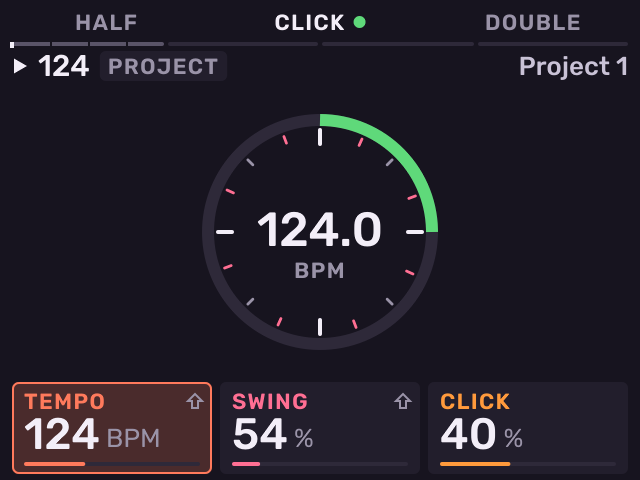
| Control | Action |
|---|---|
| K1 | Tempo. |
| K2 | Swing. |
| K3 | Click level. |
| SHIFT + K1, SHIFT + K2 | The project’s root and scale. |
| B1 | Halve the tempo. |
| B2 (CLICK) | Metronome Off, On or Rec. |
| B3 | Double the tempo. |
| Encoder | Change the tempo by 0.1 BPM. |
| − / + | Change the tempo by 1 BPM. |
| Encoder push | Switch between one tempo for the project and a tempo for each pattern. |
Each tempo change is one undo step: a turn of K1 or the encoder, or a press of B1, B3, − / + or TAP TEMPO.